When working within DataHub, each Request for Proposal (RFP) is built around essential components: Group Info, Census Data, and the Workbench. Together, these sections form the end-to-end structure for gathering, assigning, evaluating, and progressing RFPs across your organization.
Understanding what each component does—and who should have access—is critical to running a streamlined, secure, and role-appropriate process. Below is a detailed look into each section, including what users can view, manage, and configure.
1. Group Info: The Structural Backbone of the RFP
The Group Info section serves as the foundational layer of the RFP. It contains the essential identifying information for the group, such as group name, zip code, and contribution details. But more importantly, it’s where key user role assignments happen.
At a minimum, every RFP must have an Agent (Broker of Record) assigned. This is a mandatory field—without it, an RFP cannot be created in the system. Beyond the agent, the system supports additional optional assignments such as Sales Rep, GA/MGA, and Underwriter roles.
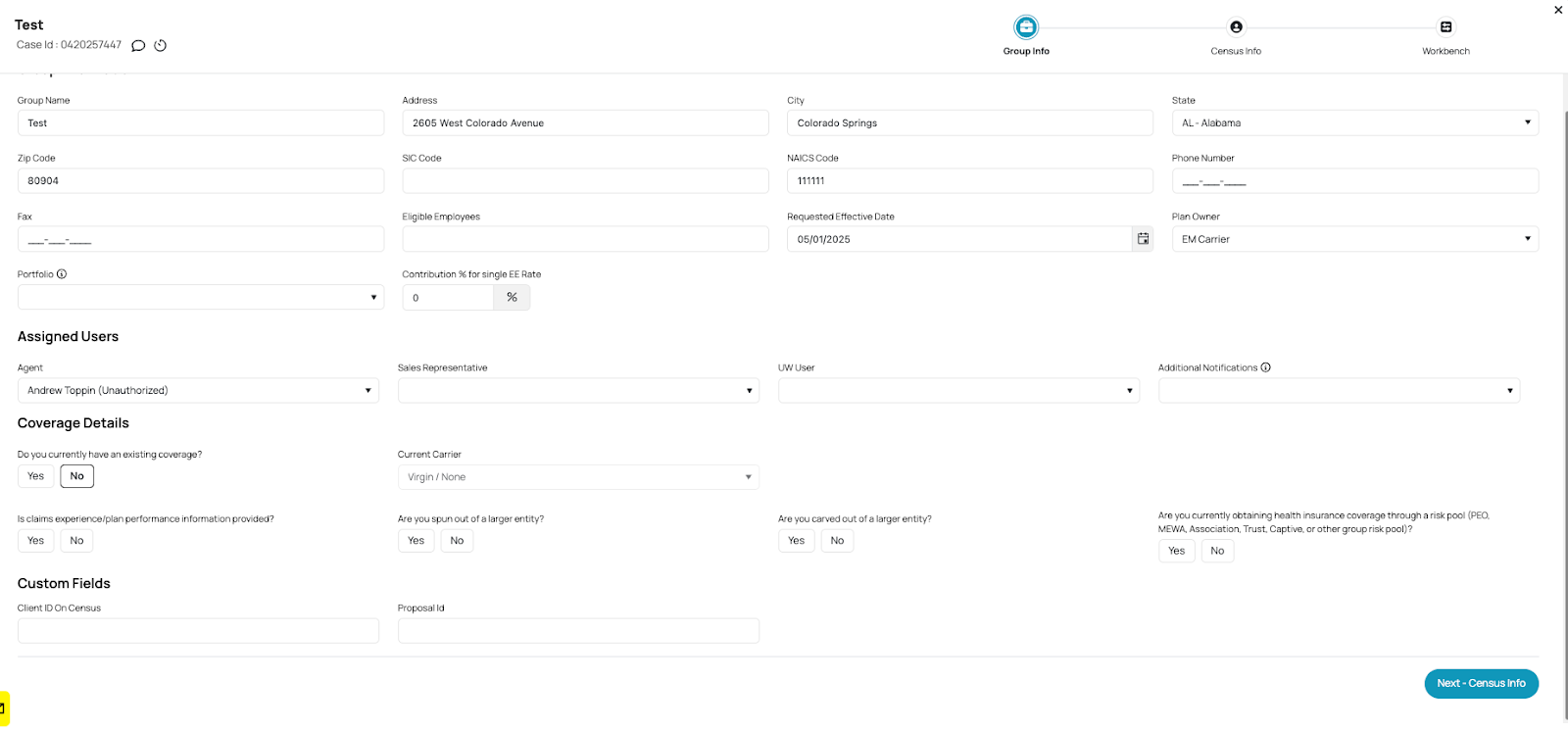
What makes this section particularly powerful is its configurability:
Admins can define which user roles populate each dropdown list.
You can control whether roles like Sales or Underwriting are required or optional.
Assignments can be restricted by role type, ensuring only designated users appear for selection.
This section is key for routing accountability, defining ownership, and shaping how RFPs flow through internal teams. Sales enablement teams, operations leads, and underwriters will all interact with this section depending on your workflow.
2. Census Data: The Core Dataset Behind Every RFP
Census data is where individual-level group information is captured. This includes fields like member first and last names, birth dates, and existing coverage status. For RFPs that use census-based evaluation (as opposed to ISQ-based), this tab becomes the heart of the submission.
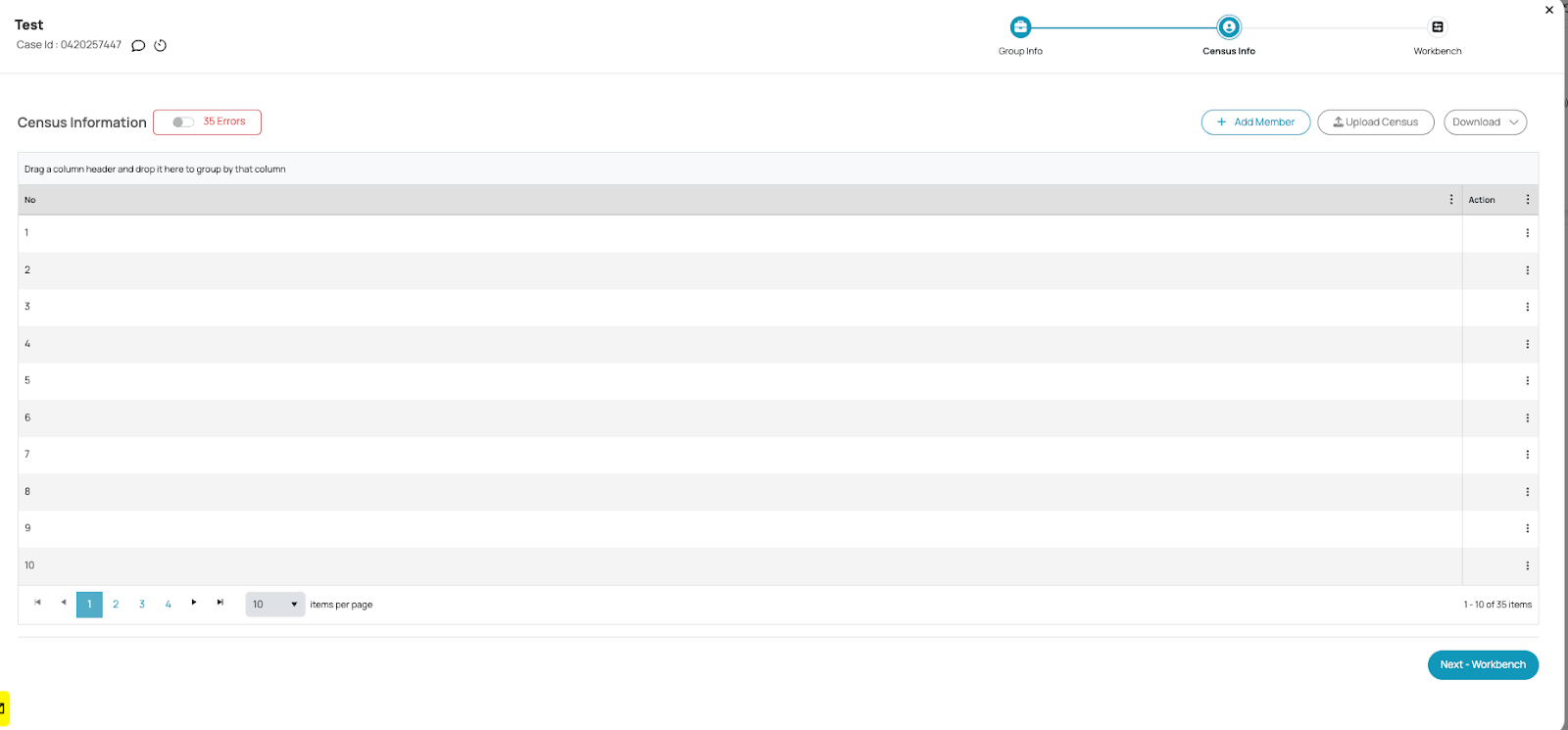
From this section, users can:
Upload and download census files.
Edit or remove member entries.
View a tabular summary of all group members tied to the RFP.
Importantly, access to this data can be tightly controlled. For example, agents or external users may only be able to see Group Info and Census Data—but not the Workbench. That level of restriction is configurable based on how you structure user roles within your instance.
In future workflows, this section can also be replaced or augmented with IHQ or ISQ data, where users manage standardized questionnaires rather than member-level records.
3. The Workbench: Scoring and Evaluation Hub
The Workbench is where all the data comes together to support underwriting, pricing, and eligibility decisions. It is designed to display scoring results generated from census data (or ISQs), and can support multiple scoring models such as Gradient, Webmark, or a custom scoring logic configured to your workflow.
Inside the Workbench, users can:
View score outputs for the RFP.
Toggle between different scoring types.
(For admin users) Configure load factors and scoring parameters.
This section is typically restricted to underwriting teams or internal admins. Agents and sales reps may not have access to the Workbench at all—or may only see a limited subset of the available data.
Why does this matter? Because the Workbench ultimately translates raw group or census data into actionable outcomes. It’s where underwriting logic is visualized, and where pricing decisions are made.
Together, these components ensure every RFP moves through your workflow with clarity, control, and compliance—empowering smarter decisions across teams.
Was this article helpful?
That’s Great!
Thank you for your feedback
Sorry! We couldn't be helpful
Thank you for your feedback
Feedback sent
We appreciate your effort and will try to fix the article