In DataHub, Reports are essential tools for tracking and managing the progress of different client data, trends, and risk assessments. There are three primary types of reports that users typically interact with: the Underwriting (UW) Report, the Request for Proposal (RFP) Report, and the Risk Score Report. Each of these reports provides vital information for monitoring and making data-driven decisions for clients and internal stakeholders. Note that Reports are available for users who have their permissions available to see these reports.
Visibility: Access to the UW report is controlled by user roles and permissions. Depending on the user’s role, they may either be granted access to view the report or have it hidden from them.
Customizable Fields: At present, all clients see the full report with standard data points,
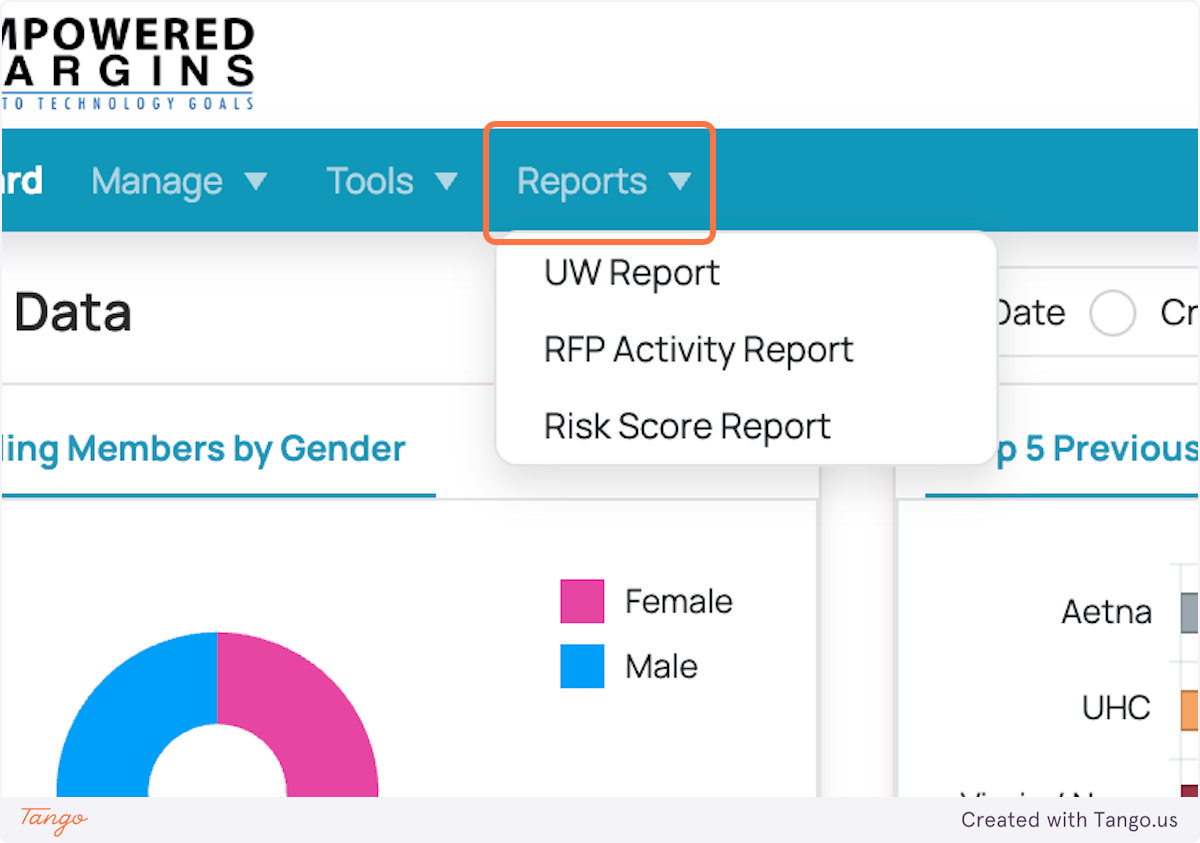
UW Report
The Underwriting (UW) Report focuses on the underwriting activities of RFPs, tracking metrics and actions taken by underwriters and other users involved in the process.
Key Features:
Provides insights into underwriting activities related to a client’s proposal.
Displays underwriting details such as requested effective dates, assigned users, portfolio information, and sales reps.
Helps monitor progress throughout the underwriting process and ensures the accuracy of risk and policy recommendations.
How to Access:
Navigate to the Reports section.
Select the UW Report from the list.
Review the key data points, including group names, requested effective dates, and other underwriting-related information.
Customization and Permissions:
Visibility: Access to the UW report is controlled by user roles and permissions. Depending on the user’s role, they may either be granted access to view the report or have it hidden from them.
Customizable Fields: At present, all clients see the full report with standard data points.

RFP Report
The Request for Proposal (RFP) Report tracks the details of proposals, including their status and various metrics related to the proposal process.
Key Features:
Allows users to review the status of proposals, including stages from submission to underwriting.
Provides details such as proposal type, expected timelines, and client-specific coverage options.
Useful for ensuring that proposals are progressing smoothly and for identifying any bottlenecks or delays.
How to Access:
Go to the Reports section in DataHub.
Select the RFP Report.
View proposal data, including group or client information and the status of various stages within the proposal process.
Customization and Permissions:
Currently, the RFP Report contains standard fields across all clients.
Permissions: The visibility of the RFP report is also managed via user roles and permissions, allowing for controlled access.

Risk Score Report
The Risk Score Report provides an overview of a client's risk profile, evaluating various risk factors that contribute to the overall risk score.
Key Features:
Displays a comprehensive risk score based on multiple factors, such as claims history, coverage, and other demographic data.
Tracks changes in the client’s risk profile over time, which is crucial for assessing any shifts in risk.
Identifies areas of high risk or potential gaps in coverage.
How to Access:
Navigate to the Reports section.
Select the Risk Score Report.
View the risk score and contributing factors, such as claims history, policy details, and demographic information.
Customization and Permissions:
Like the other reports, access to the Risk Score Report is dependent on user permissions. Specific fields or details may be hidden depending on the user’s role.
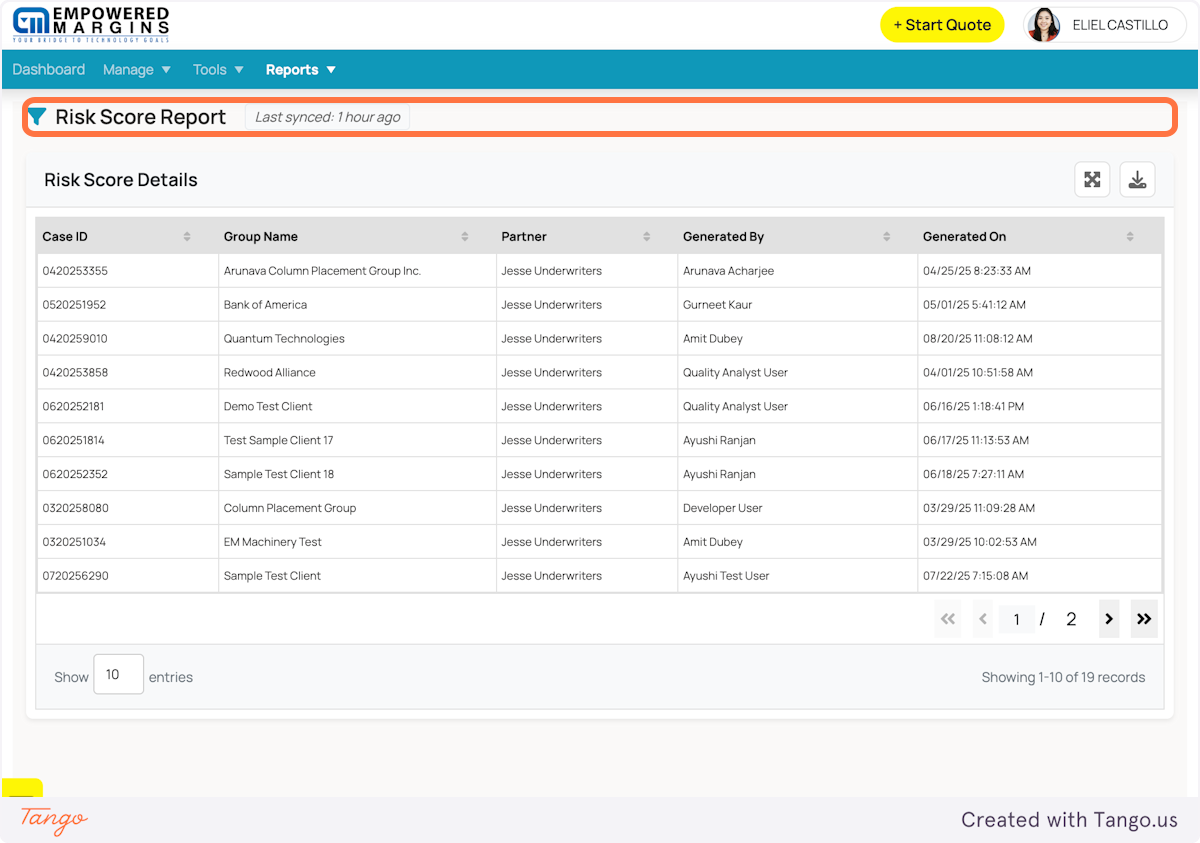
Note:
Filter and Search Functions: Always use the filter and search options within the reports to narrow down the information to exactly what you need.
By following these steps, you can efficiently generate, review, and interpret UW, RFP, and Risk Score reports to drive informed decisions and ensure client satisfaction.
Was this article helpful?
That’s Great!
Thank you for your feedback
Sorry! We couldn't be helpful
Thank you for your feedback
Feedback sent
We appreciate your effort and will try to fix the article