The Smart Rules Engine is a powerful tool that enables users to configure rules for manipulating risk scores, setting workflow rules, and incorporating geofactor data into their underwriting processes. This engine allows for flexibility in adjusting how risks are assessed and how workflows are managed.
Overview
The Smart Rules Engine allows users to:
Manipulate Risk Scores using Risk Tuner rules by adjusting specific factors that affect the final risk score.
Set up workflow rules to display warnings (e.g., red flags) without altering risk scores.
Upload geofactor data to include location-based risks into the risk score calculation.
The feature enables clients to have fine control over how risk scores are calculated and how workflow processes are managed, ensuring that the underwriting process remains flexible and accurate.
Key Features
Risk Tuner:
The Risk Tuner allows clients to configure specific rules that directly manipulate the risk score. Rules can include adding, subtracting, multiplying, or dividing different factors in the scoring process.
This enables customized risk assessments based on the client's needs.
Workflow Rules:
Workflow Rules are used to set up informational alerts or warnings (e.g., red flags) throughout the workflow process. These warnings help to identify issues, but they do not affect the final risk score.
Workflow rules help keep the underwriting process in check by alerting users about potential issues or missing information that needs attention.
Geofactor Upload:
The Geofactor Upload feature allows clients to upload location-based data (such as geographic risk factors) that can influence the final risk score.
This feature allows for the integration of geofactors into the risk calculation to account for regional differences in risk.
Risk Score Manipulation:
Risk Tuner can directly manipulate the risk score based on customized rules, while workflow rules serve as alerts and notifications for users, without impacting the scoring itself.
How to Use the Smart Rules Engine
Step 1: Access the Smart Rules Engine
Navigate to the "Manage" section in the menu and select Workbench Setup.
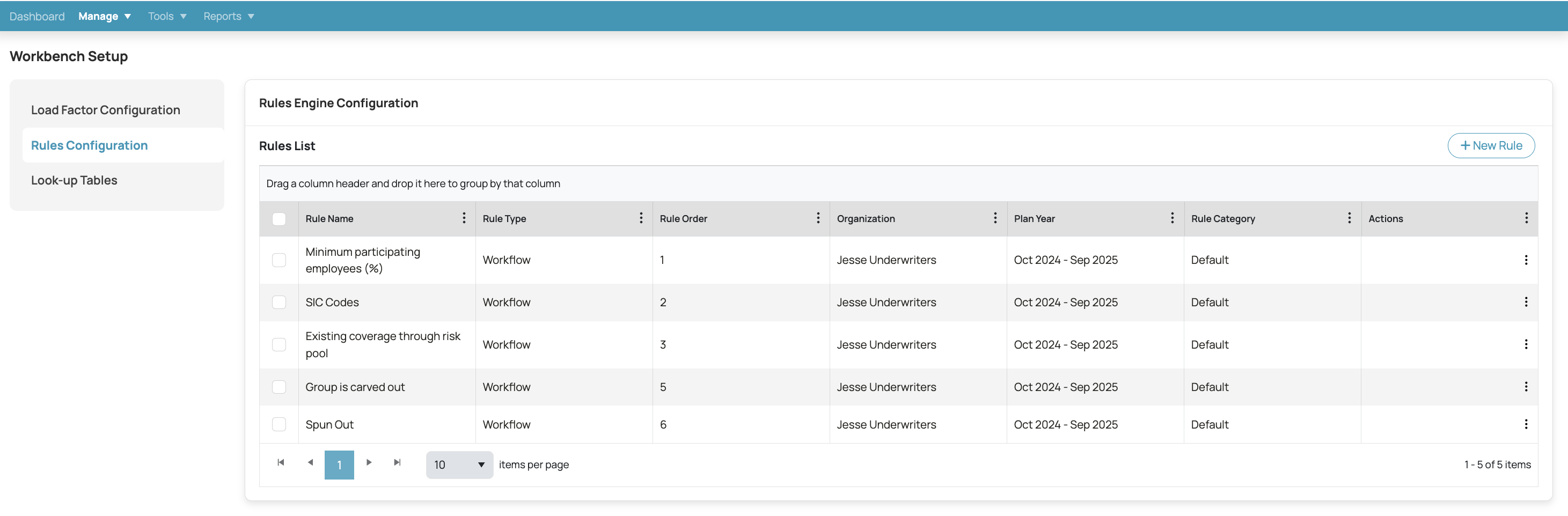
Choose Rules Configuration from the available options to access the Smart Rules Engine settings.
Step 2: Enable the Rule Engine
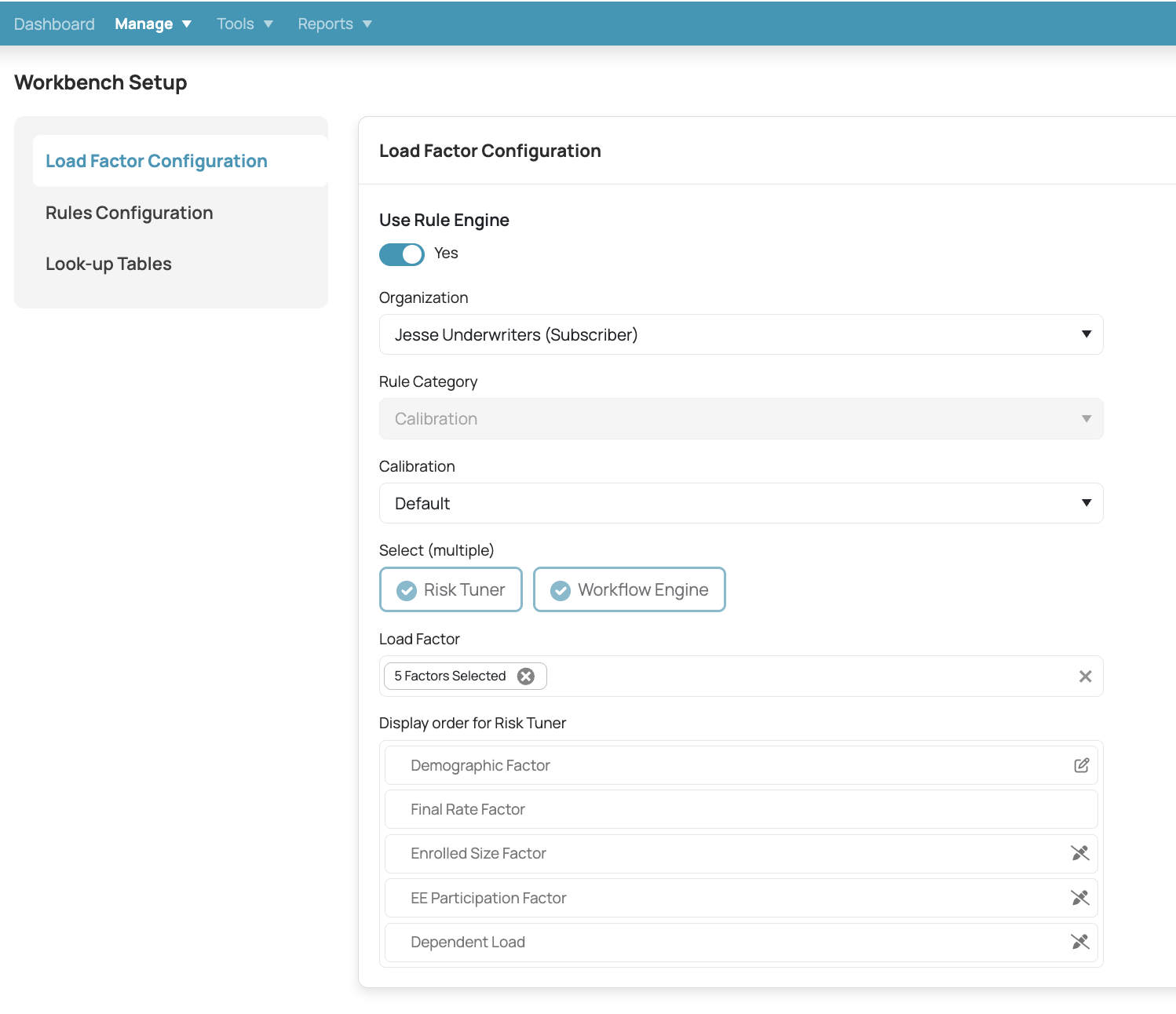
In the Load Factor Configuration section, toggle the Use Rule Engine to Yes.
Select the relevant Organization and Calibration settings.
Step 3: Configure Risk Tuner
Under the Select section, choose Risk Tuner. This will allow you to select the factors you want to manipulate within the risk score.
For example, you can choose:
Demographic Factor
Final Rate Factor
Enrolled Size Factor
EE Participation Factor
Dependent Load
These factors will then influence the final risk score calculation.
Step 4: Configure Workflow Rules
Go to the Rules Configuration tab to set up your workflow rules.
Click on + New Rule to create a new rule. Workflow rules serve as informational alerts or warnings without affecting the risk score.
These warnings help guide users and keep the workflow organized, ensuring no critical steps are missed.
Step 5: Upload GeofactorsIn the Look-up Tables section, navigate to Geo Factor Upload.
Click Browse File to upload your geofactor data file (acceptable file types include .xlsx, .xls, and .xlsb).
Select the organization, category, and calibration for the geofactor data.
This data will be used to adjust the risk score based on geographic or location-based factors.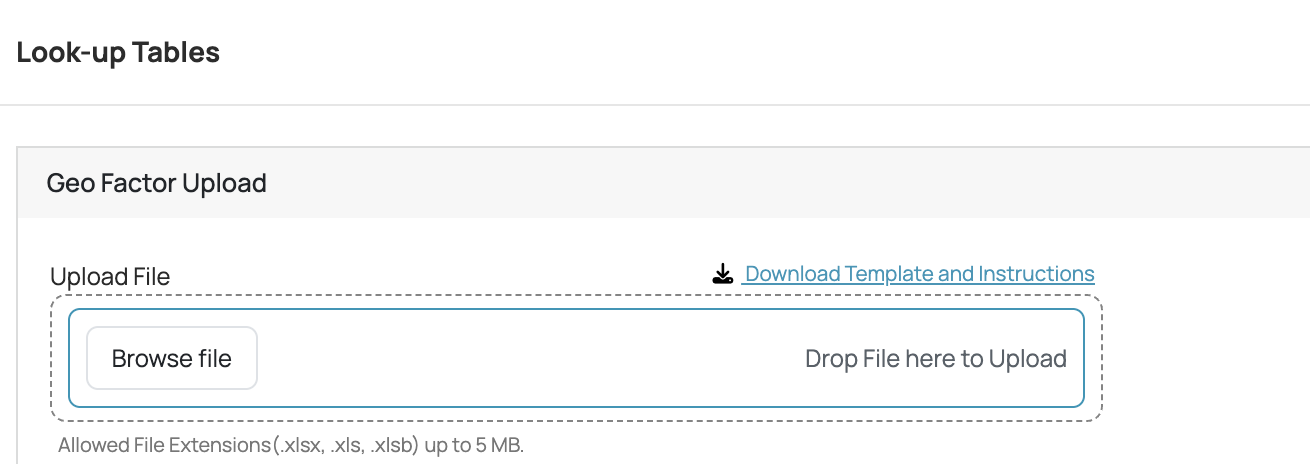
Step 6: Viewing and Managing Rules
Once rules are configured, you can view, edit, and manage them in the Rules Configuration section.
Each rule will have important details such as:
Rule Name
Rule Type (e.g., Workflow, Risk Tuner)
Rule Order (to define the sequence of rules in the process)
You can reorder or update these rules as needed.
Best Practices for Using the Smart Rules Engine
Regularly Review and Update Rules:
Keep your Risk Tuner rules and workflow rules up to date based on changing underwriting requirements. This ensures that your risk assessments stay relevant and accurate.
Thoroughly Test Changes:
After modifying or adding new rules, always test them to verify that the system behaves as expected. This prevents errors in the workflow or inaccurate risk score calculations.
Communicate Changes to Team Members:
When changes are made to the Risk Tuner configuration or workflow rules, ensure that all relevant team members are informed. This will help prevent confusion and ensure that the changes are properly integrated into the workflow.
Optimize the Use of Geofactors:
Geofactors can greatly influence risk scores based on location-specific data. Upload only relevant geofactors that directly impact the underwriting process, and regularly update these factors as geographic conditions change.
Was this article helpful?
That’s Great!
Thank you for your feedback
Sorry! We couldn't be helpful
Thank you for your feedback
Feedback sent
We appreciate your effort and will try to fix the article